큐브리드 설치 메뉴얼
환경 :
NHN클라우드
|
HOST |
Client |
|
CentOS 7.8 T2.c1m1 CUBRID 10.2
|
Windows 10 , MacOS Big sur CUBRID Manager 10.2 |
인스턴스 생성 후
포트 접속을 허용시킨다
|
서비스 |
포트 |
|
CUBRID Manager |
8001 |
|
질의편집기 |
30000-30040 |
|
응용개발 |
33000-33040 |
|
[centos@cubrid ~]$ sudo su - [root@cubrid ~]# useradd cubrid [root@cubrid ~]# su - cubrid [cubrid@cubrid ~]$ wget https://ftp.cubrid.org/CUBRID_Engine/10.2/CUBRID-10.2-latest-Linux.x86_64.sh [cubrid@cubrid ~]$ sh CUBRID-10.2-latest-Linux.x86_64.sh [cubrid@cubrid ~]$ . .cubrid.sh [cubrid@cubrid ~]$ cubrid service start
|
Client
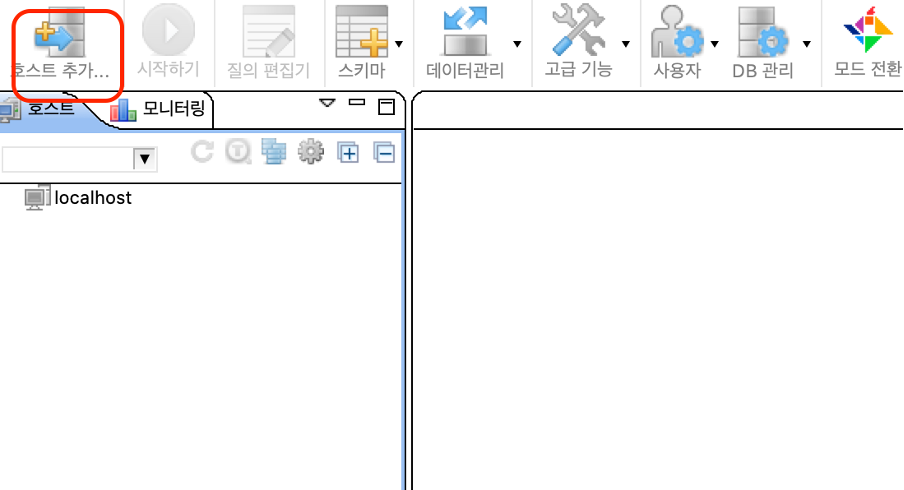


연결점검을 하면 다음과 같이 나올 수 있다.
연결후엔 비밀번호를 새로 지정하라고 나온다.

연결된 모습, 데모db는 정지되어있다.


시작하면 이렇게 안될 수도 있다.
|
[cubrid@cubrid ~]$ cubrid server start demodb @ cubrid server start: demodb
This may take a long time depending on the amount of recovery works to do.
--->>> *** FATAL ERROR *** LOG FATAL ERROR: log_def_trantable Please consult error_log file = /home/cubrid/CUBRID-10.2.2.8874-f681dd9-Linux.x86_64/log/server/demodb_20210111_2246.err for additional information ... ABORT/EXIT IMMEDIATELY ...<<<--- ++ cubrid server start: fail |
다시 서버로 돌아가서 콘솔로 직접 실행시켜본다.
그리고 에러 확인
|
[cubrid@cubrid ~]$ cat /home/cubrid/CUBRID-10.2.2.8874-f681dd9-Linux.x86_64/log/server/demodb_20210111_2246.err
Time: 01/11/21 22:46:01.732 - ERROR *** file /home/jenkins/workspace/cubrid_release_10.2/src/storage/page_buffer.c, line 4756 ERROR CODE = -3, Tran = 0, CLIENT = :(0), EID = 1 Out of virtual memory: unable to allocate 537133056 memory bytes.
Time: 01/11/21 22:46:01.733 - FATAL ERROR *** file /home/jenkins/workspace/cubrid_release_10.2/src/transaction/log_tran_table.c, line 498 ERROR CODE = -644, Tran = 0 LOG FATAL ERROR: log_def_trantable /home/cubrid/CUBRID-10.2.2.8874-f681dd9-Linux.x86_64/lib/libcubrid.so.10.2(0x23becb): _Z27er_dump_call_stack_internalR12print_output
|
에러가 담긴 로그파일의 일부, 메모리 부족으로 인한 오류 이다.
|
[cubrid@cubrid conf]$ vi /home/cubrid/CUBRID-10.2.2.8874-f681dd9-Linux.x86_64/conf/cubrid.conf
|
|
# Size of data buffer are using K, M, G, T unit data_buffer_size=512M
# Size of log buffer are using K, M, G, T unit log_buffer_size=256M
|
파일의 일부분, 지금 보이는 것에서 반씩 줄여준다.

이렇게 하면 작동 된다
|
[cubrid@cubrid conf]$ free total used free shared buff/cache available Mem: 1014804 152068 557272 13348 305464 707140 Swap: 0 0 0
|
|
[cubrid@cubrid conf]$ free total used free shared buff/cache available Mem: 1014804 636920 71384 13348 306500 222288 Swap: 0 0 0
|
DB실행 전과 후


Demodb를 더블 클릭 하면 다음과 같이 나온다.
기본값은 비밀번호가 없어서 확인만 누르면 된다.


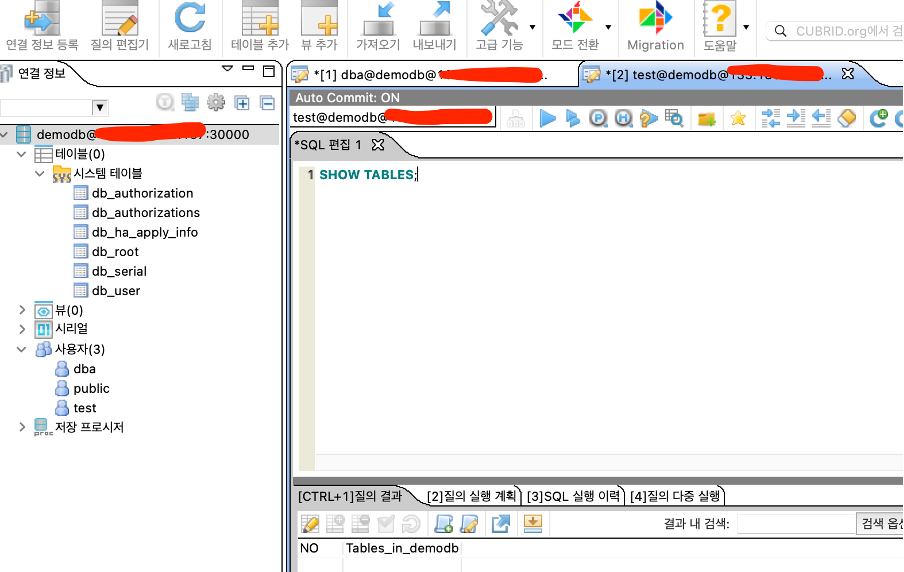
샘플 테이블이 원래는 있어야하는데 왜 없는지는 모르겠다.
